Reviewed · SEOUL TOURS
South Korea eSIM (3-30 days. Up to 45GB)
The useful trick here is simple: buy your South Korea eSIM before you fly, scan the QR code from your email, and arrive with mobile data ready. You avoid an airport SIM counter, a language hurdle, and the small panic of trying to find Wi-Fi after a long flight.
I like the low starting price of $5 per person and the choice of plans lasting 3 to 30 days. I also like the 3G fallback after your high-speed allowance runs out, since basic maps and messages may still work. The main concern is phone compatibility, plus a confusing note about Canadian provinces in the product details that does not match a South Korea data plan.
Key points to know before buying
- QR code delivery by email: You receive the eSIM digitally, with no pickup point or in-person meeting.
- Plans from 3 to 30 days: Choose a duration that fits a short Seoul break or a longer visit.
- Up to 45GB of high-speed data: After the stated allowance, service switches to 3G speed.
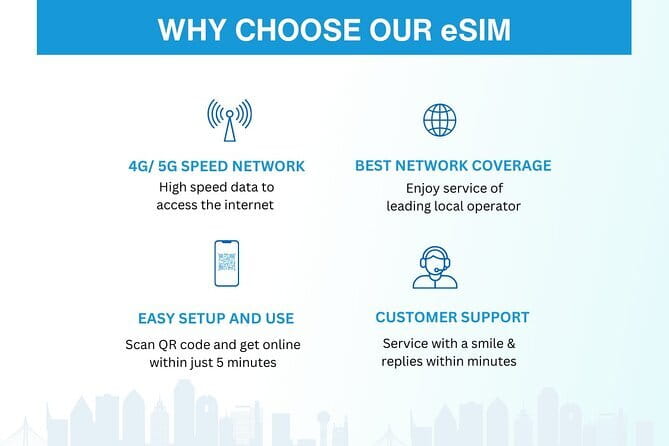
- 4G and 5G where available: The connection uses local networks, though speed and coverage can vary.
- Restarting may help activation: Turn on data roaming after landing, and restart your phone if the eSIM does not connect fully.
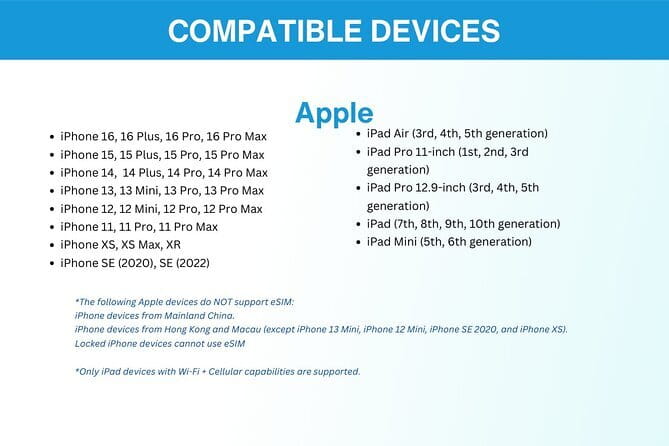
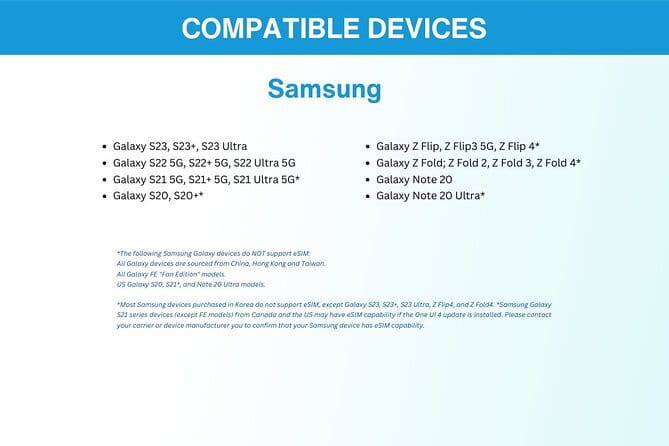
- Check your handset first: Compatible examples include iPhone XS and later, Pixel 3 and later, and Samsung S20, S21, and Fold models.
Why a South Korea eSIM can make arrival easier
A working data connection changes the first hour of a trip. You can check directions, contact the person meeting you, translate a sign, or look up transport information without searching for an airport shop.
This product is delivered by email, so the practical work happens before departure. You receive a QR code, add the eSIM profile to your phone, and activate it according to the instructions. The aim is to be online within minutes, though the exact steps depend on your phone.
That remote setup is especially handy if you dislike swapping physical SIM cards. There is no tiny plastic chip to lose, and you can leave your home SIM in place if your phone supports dual SIM use. The supplied information does not promise calls or text messages, so I would treat this as a mobile data plan, not a replacement for your regular number.
The service is designed for Seoul, but the useful range may extend beyond the capital. One account describes successful connection from Seoul to Jeju Island, with the eSIM selecting a strong local network automatically. That is encouraging, though no mobile plan can promise equal speed in every place.
Other Seoul days worth booking alongside this:
- Best DMZ Tour Korea from Seoul (Red Suspension Bridge Optional)
★ 5.0 · 41,422 reviews - DMZ Tour: 3rd Tunnel, Option(Suspension Bridge, Boat) from Seoul
★ 5.0 · 21,373 reviews - DMZ tour south Korea from Seoul (NK experience hall, defector)
★ 5.0 · 20,599 reviews
What you actually receive for the price
The starting price is listed at $5 per person. That is cheaper than many airport SIM purchases, and the value becomes stronger if you need only a few days of basic data.
You can select a period from 3 to 30 days. The available data amount depends on the option you choose, with plans reaching up to 45GB of high-speed data. Because the supplied details do not show every price and data combination, check the exact allowance before paying. A 3-day plan for maps and messages is a different deal from a 30-day plan used for video calls and streaming.
The package includes:
- Mobile data for the selected period
- The eSIM profile delivered by email
- Remote customer service by email
There is no physical item, pickup, meetup, or transport. That keeps the process quick, but it also means you need a little confidence with your phone settings. If you are not sure how to install an eSIM, ask the provider before ordering rather than waiting until you land.
Installing the QR code before your flight
The safest time to install the eSIM is before you leave home, while you have dependable Wi-Fi. Keep the email with the QR code available, then open your phone’s cellular or mobile settings and follow the eSIM installation process.
The exact menu names differ by device. The key point is to add the new eSIM profile without accidentally removing your normal SIM. Labeling the profiles clearly can help, especially if your phone shows several mobile lines.
You may be able to install the profile before the plan begins, but the supplied information does not explain the exact activation rule for each option. Read the email instructions closely. If the plan starts when installed rather than when first used, install it close to departure. If activation begins on connection in South Korea, installing it earlier is less risky.
Do not delete the eSIM after installing it unless customer service tells you to. A QR code may have limits on reuse, and deleting a working profile can turn a small setup task into a support request.
Landing in South Korea and getting connected
After arrival, you generally need to select the South Korea eSIM for mobile data. The instructions specifically point you toward turning on data roaming. That sounds alarming, but it can be normal for a travel eSIM because the plan may use a partner network.
One useful tip is to restart your phone after switching on data roaming. A connection may appear active but not fully settle until the device restarts. If you have no data, check that the eSIM is switched on, mobile data is assigned to it, and your regular SIM is not being used for data instead.
The setup is not a guided activity, so there is no staff member waiting at the airport. Remote support is available by email. That can be enough for a routine installation, but response time is not stated, so I would not leave setup until the moment you land.
Same country, a completely different kind of day:
- Seoul: DMZ Tour with Optional Suspension Bridge
★ 4.8 · 5,277 reviews - Signature DMZ Tour: Exclusive Defector Talk & Suspension Bridge
★ 5.0 · 4,459 reviews - Thrilling Korean DMZ 3rd Tunnel Tour from Seoul + Red Bridge Rush
★ 5.0 · 3,097 reviews - DMZ Past and Present: Korean Demilitarized Zone Tour from Seoul
★ 5.0 · 2,481 reviews
4G, 5G, and the 3G fallback
The plan offers 4G and 5G where available. In plain terms, you should have enough speed for navigation, web searches, translation tools, messaging, and ordinary trip planning when connected to the high-speed allowance.
The plans offer up to 45GB of high-speed data, but the cap depends on the option you buy. Once you use that allowance, the connection switches to 3G speed rather than cutting off completely. That is a useful safety net for light use, but it is not the same as unlimited fast data.
At 3G speed, you may find basic messages and simple pages workable, while video streaming, large downloads, and video calls may become frustrating. One account reports that video calls and streaming worked well during the high-speed period. I would still save large files and offline maps over Wi-Fi, especially if you have a longer 30-day plan.
Your own usage habits matter more than the headline number. Navigation can use less data than video, while social media feeds and automatic photo backups can quietly consume an allowance. Turn off automatic updates and cloud photo syncing over mobile data if you want the high-speed portion to last.
Coverage from Seoul to Jeju Island
The strongest practical point is the report of connection on the best available local network, with service from Seoul to Jeju Island. That suggests the eSIM can be useful for more than a city stay.
Still, the wording matters. The plan promises 4G and 5G where available, not a fixed speed everywhere. Buildings, underground areas, rural stretches, weather, network load, and the phone itself can affect service. The available material does not identify the Korean carrier or provide a coverage map.
For a Seoul visit, mobile data should be most useful for finding neighborhoods, checking directions, and staying in touch. If you add Jeju to your route, the reported connection is a positive sign, but I would keep important addresses and booking details saved offline. A digital connection is helpful. It should not be your only copy of essential information.
One odd detail needs attention: the description also says the data plan covers all Canadian provinces. That appears inconsistent with a product sold for South Korea. I would contact Xplori before purchase and ask them to confirm that the selected plan is intended for use in South Korea, especially if the wording remains on the checkout page.
Best uses during a Seoul trip

This eSIM is most useful for tasks that depend on quick access rather than heavy data. You can check a map while walking, message family, look up opening hours, and use translation tools without hunting for public Wi-Fi.
It can also help you keep your regular phone number available if your device supports more than one SIM. The supplied information does not explain voice service, so calls and texts through your home carrier may still depend on your normal plan. Check with your carrier about roaming charges before departure.
For longer stays, the larger plans may suit you better. Up to 45GB gives you room for frequent browsing and some media use, though the exact value depends on the plan price and duration. For a short visit, paying for a smaller allowance may make more sense than buying data you will not use.
The environmental benefit is modest but real: an eSIM does not require a disposable plastic SIM card or a physical package. That is not the main reason to buy it, but it is a pleasant side benefit.
Who should choose this eSIM
I would consider this product a good match for:
- Someone visiting Seoul for 3 to 30 days
- A person who wants data active soon after landing
- Anyone who prefers not to visit an airport SIM desk
- A phone owner comfortable scanning a QR code and changing mobile settings
- Someone who needs maps, messages, translation, and trip planning on the move
- A visitor who may travel beyond Seoul, including Jeju Island
It may be less suitable if your phone does not support eSIM, if you need a Korean phone number, or if you want in-person technical help. It is also not ideal for someone who expects unlimited high-speed streaming, because the fast data allowance is capped.
Most people can participate in the sense that there is no physical exertion, age requirement, or meeting arrangement. The real requirement is a compatible unlocked phone and the ability to follow the digital setup instructions.
Cancellation, support, and small practical risks
Free cancellation is available if you cancel at least 24 hours before the experience start time. Changes or cancellations made within 24 hours are not accepted for a refund, and the cut-off uses South Korea local time.
Customer support is remote and handled by email. Save the provider’s contact details before leaving home, and keep the QR email accessible even after installation. If your phone fails to connect, a screenshot or saved copy of the instructions can make troubleshooting easier.
The biggest risk is not the network. It is buying the wrong plan, using an incompatible phone, or activating the eSIM without understanding when the validity period starts. Confirm those points before payment. Also ask about the strange Canada reference, since the rest of the product is clearly presented for South Korea.
Should you book the South Korea eSIM?
I would book it if you want an inexpensive, data-focused connection and your phone is confirmed compatible. The email delivery, 3 to 30-day choice, local 4G and 5G access, and 3G fallback make it practical for ordinary sightseeing needs.
Before buying, check the exact high-speed allowance, read the activation instructions, and contact Xplori about the Canadian coverage wording. If you need calls, texts, a local number, or hands-on airport help, choose a different SIM option. If you mainly need maps, messages, translation, and internet access, this is a sensible small purchase that can make the first day in South Korea much less fiddly.
FAQ
How long can I use the South Korea eSIM?
You can choose a plan lasting from 3 to 30 days, depending on the length of your trip.
How much does the eSIM cost?
The listed starting price is $5 per person. The exact price depends on the duration and data option selected.
How much high-speed data is available?
Plans offer up to 45GB of high-speed data. The exact allowance depends on the option you choose.
What happens after I use the high-speed allowance?
After the stated high-speed data cap is reached, the connection switches to 3G speed rather than ending completely.
Does the eSIM support 4G and 5G?
It provides 4G and 5G where available. Actual speed depends on local availability and network conditions.
How do I receive the eSIM?
You receive the eSIM by email after ordering. The email includes a QR code used to install the eSIM profile.
Do I need to meet anyone or collect anything?
No. This is a digital product with no pickup point, meetup, or physical delivery.
Which phones support this eSIM?
Examples listed as compatible include iPhone XS and later, Pixel 3 and later, and Samsung S20, S21, and Fold models. Contact the provider if you are unsure about your phone.
Do I need to turn on data roaming?
Yes. The setup information says to turn on data roaming after landing. Restarting your phone may also help the eSIM activate fully.
Can I cancel for a full refund?
Yes, if you cancel at least 24 hours before the experience start time. Cancellations made less than 24 hours in advance are not refunded.
Just added around Seoul
- Seoul: Korean & English Language Exchange Global Party★ 5.0 · 28 reviews
- From Seoul: Yongpyong Ski Day Tour with Transportation★ 4.9 · 40 reviews
- You’re Invited to Our Home in Seoul: The Only Cooking Class!★ 5.0 · 8 reviews
- Your Personal Seoul Photographer!★ 4.1 · 15 reviews
- Unique Native Experience : Han River Picnic, Board game, BBQ★ 5.0 · 3 reviews
- From Seoul: Hwacheon Ice Fishing and Lighting Festival Tour★ 4.5 · 4 reviews
- Seoul: Gangneung BTS K-Pop & K-Drama Filming Locations Tour★ 4.6 · 14 reviews
- Seoul Private RV tour, explore real Korea from Past to Future★ 5.0 · 5 reviews
Seoul Tours, compared.
Best DMZ Tour Korea from Seoul (Red Suspension Bridge Optional)
Read our review →
DMZ Tour: 3rd Tunnel, Option(Suspension Bridge, Boat) from Seoul
Read our review →
DMZ tour south Korea from Seoul (NK experience hall, defector)
Read our review →

Thrilling Korean DMZ 3rd Tunnel Tour from Seoul + Red Bridge Rush
Read our review →
DMZ Past and Present: Korean Demilitarized Zone Tour from Seoul
Read our review →
Ultimate Korea DMZ Tour from Seoul (Gondola & Suspension Bridge)
Read our review →